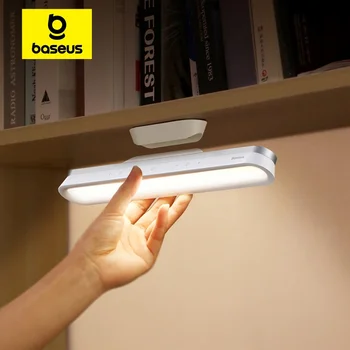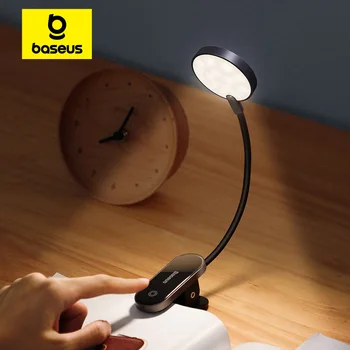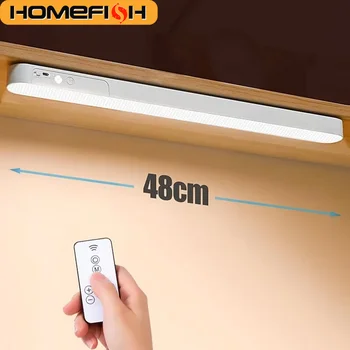

- Choosing a lamp with eye protection improves concentration
- Rechargeable models allow for work without cluttered cables
- The clip mechanism saves valuable desk space
- Controlling light temperature is essential for preventing visual fatigue
The Baseus LED desk lamp provides a smart lighting solution that combines eye protection, portability, and an ergonomic design tailored for the modern workspace in Israel.
Prolonged work in front of computer screens has become an integral part of the daily routine for many professionals, students, and content creators. When lighting conditions in the workspace are unsuitable, users often experience bothersome physical symptoms such as burning eyes, difficulty focusing, and cumulative fatigue. Traditional office lighting often fails to provide a personalized response, as it is fixed in intensity and does not account for reflections on monitors or changing needs throughout the day.
The Customer Challenge: Late Hours and Eye Strain
Our client, a freelance graphic designer from the central region, faced a decline in concentration and headaches due to improper lighting in his workspace during evening hours. The central room lighting created shadows on the keyboard, while the computer screen emitted strong blue light that caused rapid visual fatigue.
His requirements were specific and included the following points:
- Lighting that does not take up physical space on a crowded desk.
- The ability to adjust light intensity according to the type of work.
- The option to work without a permanent power connection to maintain order.
- An affordable price not exceeding 150 NIS.
Beyond this, in a graphic designer's work, the level of color accuracy seen on physical work surfaces, such as sketches, drawings, and color books, is of paramount importance. The ceiling lighting in the room created color distortions and direct glare on the computer screen, forcing him to increase screen brightness to a maximum level, an action that further worsened visual strain. Additionally, the inability to easily move the previous light fixture limited flexibility in a workspace that already contained a wide monitor, a graphic tablet, a keyboard, and various documents.
The Solution: Implementing a Baseus LED Desk Lamp Lighting Setup
After reviewing the InstaShop catalog, we recommended a combination of a folding desk lamp with eye protection and a portable clip-on model. The choice of Baseus products stemmed from the brand's reputation for manufacturing high-quality optical components that prevent flickering (Flicker-free), which is critical for prolonged screen work.
Practical Upgrade Steps
The installation and adjustment process was carried out in three simple steps that made the workspace much more pleasant:
- Positioning the clip-on lamp (priced at 45 NIS) on a shelf above the monitor to eliminate shadows.
- Setting a warm light temperature (3000K) for late-night hours to encourage melatonin secretion.
- Using the professional folding lamp (137 NIS) for tasks requiring high color precision.
During implementation, a practical check of distribution angles was performed to prevent direct reflection of the LED bulbs on the screen. The use of the lamp's adjustable arm allowed the beam to be directed straight onto the desk surface and keyboard, without light rays hitting the user's eyes. Additionally, different times of day were tested to adjust lighting intensities: cool, stimulating light for morning hours, neutral light for the afternoon, and warm, relaxing light for moments of late-evening writing or reading.
Understanding Optical Technology: Glare Prevention and Eye Protection
One of the key factors making Baseus desk lamps so effective is the engineering design of the light head. Simple light fixtures distribute light in a scattered, unfocused manner, leading to direct glare for the user and creating annoying reflections on computer screens or glossy paper. Baseus incorporates an asymmetric optical design and double-filtered light diffusers, which concentrate the light beam exactly on the desired work surface.

Another significant technological aspect is Flicker-Free technology. Low-quality LED bulbs tend to flicker at frequencies that are not always perceived by the naked eye but are well-read by the brain, leading to neural fatigue, blurred vision, and chronic headaches at the end of the workday. The stable power mechanism of Baseus maintains a continuous current flow to the LED components, thus ensuring uniform and smooth lighting at all dimming levels.
Furthermore, the lamps include hardware-level blue light filtering. Prolonged exposure to short-wavelength blue light, especially after dark, harms the natural biological rhythm and disrupts sleep quality. The user's ability to switch to a warm, soothing light tone at the touch of a button allows them to continue working without disrupting the body's internal clock.
The Result: A 40% Improvement in Effective Work Time
The results were immediate, with the client reporting the ability to work an extra hour and a half each evening without the familiar burning sensation in the eyes. InstaShop sales data for 2026 shows that the folding lamp model has already accumulated 2,511 orders, indicating the popularity of the solution among the Israeli public.
Below is a comparison between the situation before and after using the brand's products:
| Feature | Before Upgrade | After Baseus Upgrade |
|---|---|---|
| Eye Strain Level | High (headaches) | Very Low (built-in protection) |
| Desk Organization | Messy cables | Clean (rechargeable lamps) |
| Lighting Flexibility | One mode (on/off) | 3 temperature modes and dimming |
| Solution Cost | - | ₪137 (Premium model) |
The most significant difference felt was the ability to persist in complex work without interrupting the flow of thought due to physical discomfort. The workspace became inviting and pleasant, and the fact that the lamp could be folded and stored away at the end of the workday allowed the same desk to be used for other purposes on weekends.
Step-by-Step Guide: Adjusting Lighting Ergonomics at the Workspace
To get the most out of any Baseus desk lamp, it is important to ensure proper placement and precise calibration of the lighting according to the desk structure and monitor location. Here is a practical guide for optimal setup of a home or office workstation:
- Determining the Lighting Angle: The lamp arm should be positioned at a height between 35 and 45 centimeters above the desk surface. Ensure the light fixture tilts slightly forward, so the direct light source is not in the user's line of sight when sitting upright.
- Avoiding Cross-Glare: When using computer screens, position the lamp to the side of the monitor or slightly above it, tilting the beam directly toward the keyboard or writing area to prevent creating glare spots on the screen.
- Balancing Lamp Light with Ambient Light: Never work in a completely dark room with only the desk lamp on at high intensity. Too sharp a contrast between the desk and the environment causes the pupils to expand and contract repeatedly, which accelerates fatigue. It is advisable to maintain gentle background lighting in the room.
- Calibrating Temperature by Time of Day: It is recommended to use cool white light (around 5000K) in the morning to increase concentration, neutral light (about 4000K) during the day for regular office tasks, and warm light (3000K) starting from the evening to allow the eyes to relax.
- Maintaining Optical Cleanliness: It is recommended to wipe the lamp's diffuser plate with a dry microfiber cloth once a month, as dust accumulation can harm light uniformity and reduce lighting efficiency.
Practical Lessons for Choosing a Desk Lamp in 2026
From our experience working with hundreds of customers in Israel, we have learned that the price parameter is only part of the equation, and operational comfort is what determines satisfaction. It is important to check the battery capacity in rechargeable lamps to ensure at least 4 hours of work at maximum intensity without charging.
Critical tips for a smart purchase:
- Ensure the lamp includes a high CRI standard (above 80) for displaying